AI Overview tracking: how to monitor citations, mentions, and CTR
How to track Google AI Overviews: presence rate, cited URLs, brand mentions, competitor share of voice, Search Console impact, and the page fixes that improve source ownership.
AI Overview tracking is the process of monitoring when Google shows an AI Overview for your target searches, which sources it cites, whether your brand is mentioned, and how those answers change over time. The fast win is to stop treating AI Overviews as a mysterious SERP feature and start scoring them like a weekly visibility surface.
Use this when rankings look stable but clicks, impressions, or buyer discovery are moving in ways your normal SEO dashboard cannot explain.
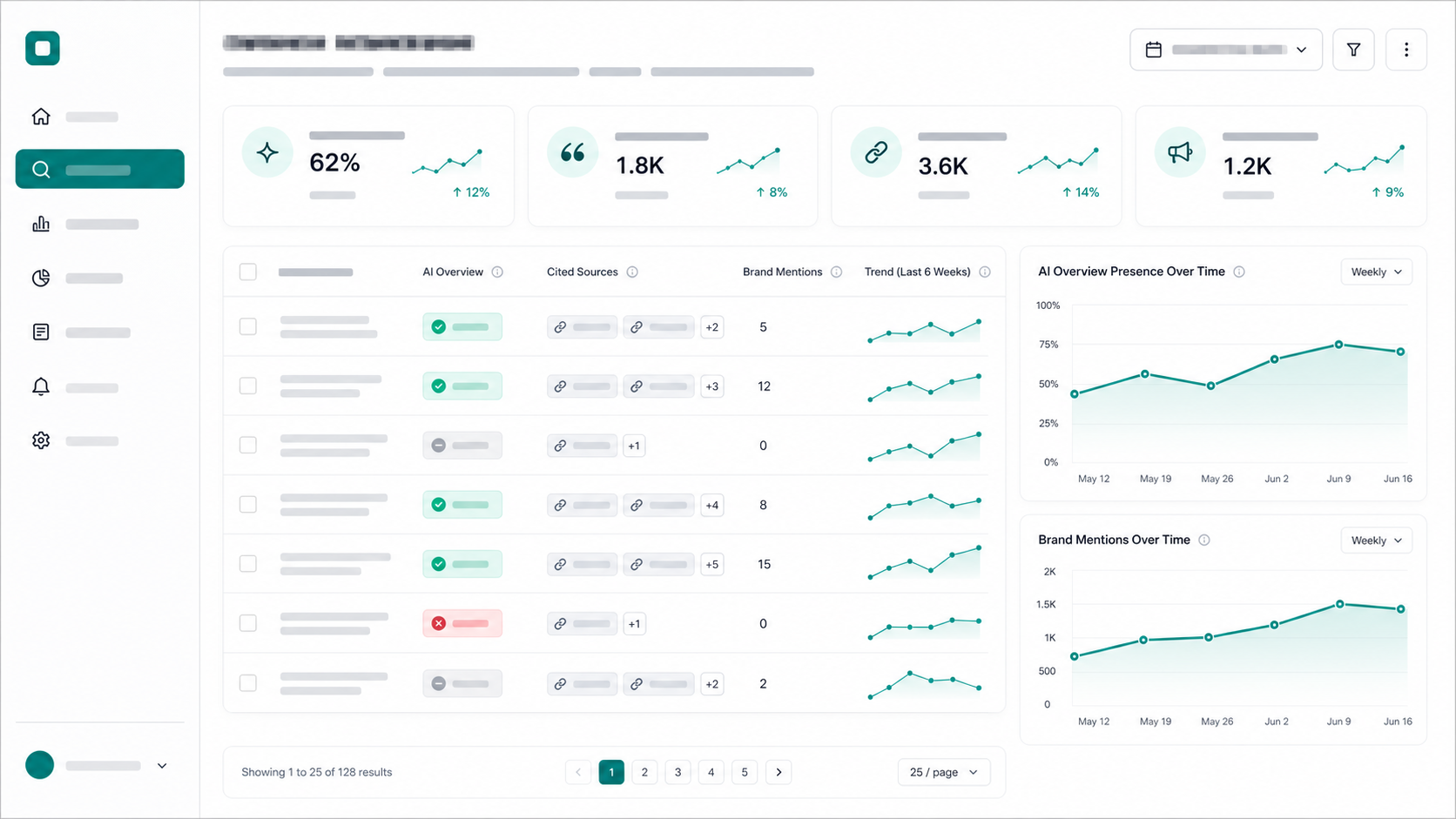
Google says its AI features in Search use the same core SEO principles as regular search, but the measurement problem is different: the answer may satisfy the query before the user clicks. That means a normal rank tracker is no longer enough. You need to know whether the AI Overview appeared, which pages were pulled into the answer, and whether your brand was part of the summary.
What is AI Overview tracking?
AI Overview tracking is the practice of checking target Google searches for AI Overview presence, cited links, cited domains, brand mentions, answer themes, and week-over-week changes. It turns "are we showing up in Google AI answers?" into a measurable report instead of a manual spot check.
AI Overview tracking is a subset of AI search visibility. AI search visibility covers ChatGPT, Claude, Perplexity, Gemini, and Google AI surfaces. AI visibility tracking is the cross-surface workflow; AI Overview tracking focuses on Google's search results page, where an AI-generated answer may appear above or among traditional organic results.
Track it separately from ChatGPT citation tracking, Gemini citation tracking, AI Mode tracking, Perplexity SEO, and the broader AI brand monitoring workflow. The mechanics overlap, but Google AI Overviews still sit inside a search results environment with ads, organic listings, Search Console reporting, snippets, and Google-specific crawl controls.
For the boundary between a traditional Google answer box and a multi-source AI answer, use the AEO vs featured snippets guide.
Why should you track AI Overviews separately from rankings?
Track AI Overviews separately because a keyword can keep its organic position while the visible search experience changes completely. The AI answer can cite a competitor, summarize the category, answer the question directly, or push the first organic result lower on the page.
Use this decision table before deciding whether a keyword belongs in the AI Overview tracking set:
| Search result pattern | What it means | What to track |
|---|---|---|
| AI Overview appears and cites competitors | You have a source ownership problem | Cited URLs, cited domains, brand mentions |
| AI Overview appears and cites you | You have visibility, but need quality control | Citation position, answer accuracy, conversion path |
| AI Overview appears with no obvious buyer source | Google is synthesizing broad advice | Entity clarity, expert sources, page structure |
| No AI Overview appears today | The query may still flip later | Presence rate over time |
| Your rank is stable but clicks drop | SERP layout may be absorbing demand | AI Overview presence plus Search Console CTR |
Google's documentation on AI features says site owners can use Search Console and other analytics tools to understand traffic, but Search Console does not give a clean "this impression came from an AI Overview citation" export. That gap is why separate tracking matters.
Which keywords belong in an AI Overview tracking set?
Start with keywords where the answer can influence a buyer's shortlist or action. Do not track every informational keyword. Track the searches where the AI answer can name a vendor, cite a source, frame a problem, or reduce the need to click.
For a B2B SaaS company, build the set from six buckets:
| Bucket | Count | Example searches |
|---|---|---|
| Category definition | 8 | "what is AI search visibility", "what is answer engine optimization" |
| Workflow | 10 | "how to track AI Overviews", "how to measure AI search visibility" |
| Tool shortlisting | 10 | "best AI visibility tools", "AI Overview tracking tools" |
| Comparison | 8 | "Tracemetry vs Profound", "Otterly vs Peec" |
| Failure mode | 8 | "why did organic traffic drop after AI Overviews" |
| Revenue pages | 6 | Searches tied to pricing, demos, audits, and use cases |
Add entity terms that disambiguate the surface and use case: Google AI Overviews, AI Mode, Search Console, cited sources, organic clicks, AI search visibility, answer engine optimization, generative engine optimization, brand mentions, citation rate, source ownership, B2B SaaS, product pages, comparison pages, and FAQPage schema.
The exact-match keyword matters for repeatability. The conversational version matters because AI answers are often triggered by natural questions: "how do I know if AI Overviews cite my site?", "why does Google AI cite competitors?", and "what is the best way to track AI Overview visibility?"
How do you track AI Overviews manually?
Manual AI Overview tracking works for a small set if you standardize the location, device, logged-in state, query wording, and date. The mistake is taking screenshots when something looks weird and calling that measurement.
Use this weekly workflow:
- Lock the query set. Start with 40-80 searches and do not rewrite them every week.
- Set the test environment. Use the same country, language, browser state, and device class.
- Record AI Overview presence. Mark yes/no for each query.
- Capture cited URLs. Save cited source URLs, cited domains, and order when visible.
- Score brand mentions. Record whether your brand, competitors, or publishers appear in the answer.
- Classify answer intent. Definition, how-to, shortlist, comparison, troubleshooting, or transactional.
- Compare weekly. Watch presence rate, citation rate, and competitor share of voice.
For a quick baseline, run the free Tracemetry audit. For ongoing work, connect the query set to visibility tracking so you can stop rebuilding the spreadsheet every Friday.
What metrics should an AI Overview report include?
A useful AI Overview report includes presence rate, citation rate, source ownership, brand mention rate, competitor share of voice, answer accuracy, and Search Console impact. The report should identify the pages to fix, not just prove that AI Overviews exist.
Track these metrics:
| Metric | Formula | Why it matters |
|---|---|---|
| AI Overview presence rate | Queries with an AI Overview / tracked queries | Shows how exposed the keyword set is |
| Citation rate | Queries citing your domain / tracked queries | Measures whether your site is a source |
| Brand mention rate | Queries naming your brand / tracked queries | Measures recommendation visibility |
| Competitor SOV | Competitor mentions / all tracked brand mentions | Shows who the AI answer favors |
| Source ownership | Your cited URLs / all cited URLs in your category | Separates brand awareness from citation control |
| CTR delta | Search Console CTR change for tracked queries | Connects SERP change to traffic behavior |
For the competitive math, use the AI share-of-voice formula. For the page fix layer, run a generative engine optimization audit against the queries where competitors are cited and you are absent.
How do you improve AI Overview visibility after tracking?
Improve AI Overview visibility by fixing the page that should have been cited, not by publishing generic AI search content. The page needs a direct answer, clear entity language, source-backed claims, visible FAQ content, and internal links from related pages.
Use this fix sequence:
- Match the query to a target page. Pick the URL that should answer the search today.
- Add a direct answer near the top. Give Google and the reader a clean 40-80 word answer.
- Make entities explicit. Name the product, category, audience, surface, competitors, and use case.
- Add an extractable block. Use a table, checklist, short definition, or step list.
- Cite credible sources. For Google Search behavior, cite Google Search Central rather than secondhand summaries.
- Align schema with visible content. Google's structured data guidance says structured data should describe visible page content, so do not add hidden FAQ answers.
- Link the page into the cluster. Connect it from relevant GEO, schema, citation, and measurement pages.
- Re-measure in 7-14 days. Do not judge a page fix by the next refresh alone.
Google's robots and snippet controls also matter. Its robots meta documentation says snippet controls can affect how content is displayed across Search surfaces, including AI Overviews and AI Mode. If a page blocks snippets aggressively, do not be surprised when it struggles to become a cited source.
How is AI Overview tracking different from Google Search Console?
Google Search Console tells you query, page, country, device, impressions, clicks, CTR, and average position. AI Overview tracking tells you whether the AI answer appeared, what it said, who it cited, and which competitor sources shaped the answer.
Use them together:
| Tool | Best for | Blind spot |
|---|---|---|
| Search Console | Query/page performance and CTR changes | Does not export AI Overview citation ownership |
| Rank tracker | Organic position monitoring | Can miss answer content and cited source changes |
| Manual SERP review | Deep qualitative inspection | Too slow for weekly category coverage |
| AI Overview tracker | Presence, citations, brand mentions, competitors | Still needs analytics to connect visibility to revenue |
The practical loop is simple: use AI Overview tracking to find the SERP change, use Search Console to see the click impact, then use Tracemetry to prioritize the page fixes that can regain source ownership. If the next question is how to improve those citations, use the Google AI Overview SEO workflow to turn each citation loss into a target-page update.
FAQ
What is AI Overview tracking? AI Overview tracking is the process of monitoring when Google shows an AI Overview for tracked searches, which URLs and domains are cited, which brands are mentioned, and how those answers change over time.
Can Google Search Console show AI Overview citations? Search Console can show query and page performance for Google Search traffic, but it does not provide a clean export of which AI Overview cited which URL. Use Search Console for clicks and CTR, then use AI Overview tracking for presence, citations, and answer content.
How many keywords should I track for AI Overviews? Track 40-80 searches for an early B2B SaaS program. Include category, workflow, shortlisting, comparison, failure-mode, and revenue-adjacent searches. Fewer than 20 is usually too noisy for weekly decisions.
Does schema help with AI Overviews? Schema can help Google understand and classify visible page content, especially when Article and FAQPage data match what users can read. It is not a guaranteed AI Overview trigger. Treat schema as a clarity layer, not a ranking hack.
What is the fastest fix if competitors are cited in AI Overviews? Update the page that should have been cited. Add a direct answer, decision table, credible sources, visible FAQ content, Article or FAQ schema where appropriate, and internal links from related pages. Create a new page only when no existing URL matches the search intent.
Start with the searches that can cost you pipeline
Run the free AI visibility audit to see whether your brand is named and cited for buyer questions. If Google AI Overviews are already changing the SERP, use Tracemetry Pro to track prompts and searches weekly, compare competitors, generate source-grounded briefs, and re-measure after every page fix.
Frequently asked questions
What is AI Overview tracking?
AI Overview tracking is the process of monitoring when Google shows an AI Overview for tracked searches, which URLs and domains are cited, which brands are mentioned, and how those answers change over time.
Can Google Search Console show AI Overview citations?
Search Console can show query and page performance for Google Search traffic, but it does not provide a clean export of which AI Overview cited which URL. Use Search Console for clicks and CTR, then use AI Overview tracking for presence, citations, and answer content.
How many keywords should I track for AI Overviews?
Track 40-80 searches for an early B2B SaaS program. Include category, workflow, shortlisting, comparison, failure-mode, and revenue-adjacent searches. Fewer than 20 is usually too noisy for weekly decisions.
Does schema help with AI Overviews?
Schema can help Google understand and classify visible page content, especially when Article and FAQPage data match what users can read. It is not a guaranteed AI Overview trigger. Treat schema as a clarity layer, not a ranking hack.
What is the fastest fix if competitors are cited in AI Overviews?
Update the page that should have been cited. Add a direct answer, decision table, credible sources, visible FAQ content, Article or FAQ schema where appropriate, and internal links from related pages. Create a new page only when no existing URL matches the search intent.
See your own AI visibility today.
Free public report. 60 seconds. No signup. Or get started on Pro to track 250 prompts continuously.