AI crawler tracking: GPTBot, ClaudeBot, and AI search logs
How to track AI crawlers in server logs and connect GPTBot, OAI-SearchBot, Google, ClaudeBot, and PerplexityBot activity to AI citations, referral traffic, and page fixes.
AI crawler tracking is the process of finding when AI search systems, answer engines, and model crawlers request your pages, then connecting those hits to visibility outcomes such as citations, brand mentions, and referral traffic. The painful problem is simple: your server logs may show GPTBot, OAI-SearchBot, Google crawlers, ClaudeBot, or PerplexityBot, but raw crawler traffic does not tell you whether AI answers can find, trust, or cite the page.
Use the fast rule: crawler logs are evidence of access, not evidence of visibility. Track them when you need to know whether an AI surface can reach a page, whether robots.txt blocks the right crawler, and whether an important page was fetched before or after a citation changed.
This guide shows the practical workflow: identify AI crawler user agents, separate training crawlers from search/fetch crawlers, connect log hits to prompt results, and turn the data into a weekly fix queue. If you already track AI referral traffic, crawler tracking is the technical layer that explains whether AI systems could reach the pages that should earn the click.
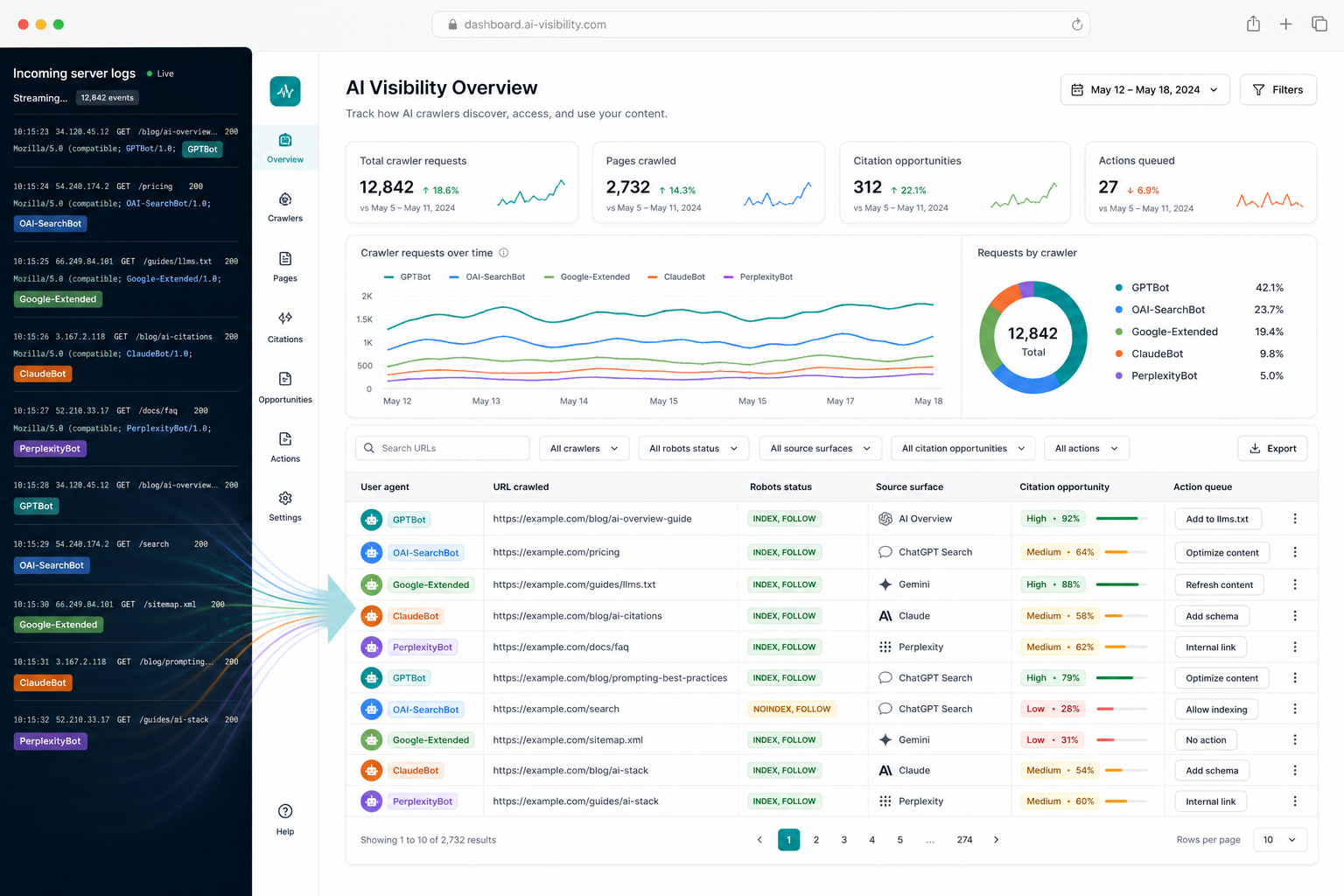
What is AI crawler tracking?
AI crawler tracking is the practice of monitoring visits from AI-related bots, fetchers, and search crawlers in server logs, CDN logs, WAF logs, or analytics edge data. It helps teams answer whether AI systems reached important pages, respected access rules, and fetched content before an answer, citation, or referral changed.
AI crawler tracking is not the same as AI visibility tracking. Crawler tracking answers, "Did the system request this URL?" AI visibility tracking answers, "Did the system mention, cite, recommend, or send traffic from this URL?" You need both layers when a page should be cited but is missing from ChatGPT, Perplexity, Claude, Gemini, Google AI Overviews, or Google AI Mode.
The most useful crawler report is page-level. A generic count of AI bot hits is noise. A report that shows "OAI-SearchBot fetched the target comparison page yesterday, but ChatGPT still cites a competitor" is actionable.
Which AI crawler user agents should you track?
Track the user agents that map to real answer-engine access paths, not every suspicious bot string on the internet. Start with official crawler documentation, then add your own verified log patterns from Cloudflare, Fastly, nginx, Apache, Vercel, Netlify, or your WAF.
Use this starting map:
| Surface | Crawler or user agent family | What it usually tells you |
|---|---|---|
| OpenAI / ChatGPT | GPTBot, OAI-SearchBot, ChatGPT-User | Training crawl, search indexing, or user-triggered retrieval depending on the agent |
| Google Search / Gemini ecosystem | Googlebot, GoogleOther, Google-Extended, Google-CloudVertexBot | Search crawling, product-specific crawling, or AI product control signals |
| Anthropic / Claude | ClaudeBot and related Anthropic bots | Anthropic crawler activity and whether robots rules are being read |
| Perplexity | PerplexityBot | Perplexity search-result surfacing and source discovery |
| Common web search | Bingbot, DuckDuckBot, Applebot, other search crawlers | Indirect AI answer inputs when assistants rely on search indexes |
Do not assume one bot equals one outcome. OpenAI documents separate crawlers for different jobs. Google separates normal Search crawlers from controls such as Google-Extended. Perplexity documents PerplexityBot as a crawler for surfacing and linking sources, not foundation-model training. Anthropic documents robots.txt controls for its bots.
How do you connect crawler logs to AI visibility?
Connect crawler logs to AI visibility by joining three records: the URL that was fetched, the AI answer where the page should appear, and the content change that could affect citation. Logs alone are too technical; prompt results alone are too squishy. The join is where the diagnosis becomes useful.
Build a weekly table with these fields:
| Field | Why it matters |
|---|---|
| URL | The page that should be cited, recommended, or used as a source |
| User agent | Which AI crawler, search crawler, or fetcher requested the page |
| Last successful fetch | Whether the system has recently reached the page |
| Status code | Whether the request got 200, 301, 403, 404, 5xx, or a blocked edge response |
| Robots state | Whether the crawler is allowed, disallowed, or ambiguous |
| Prompt bucket | Definition, comparison, shortlist, workflow, failure mode, or pricing-adjacent |
| Citation status | Target URL cited, domain cited, wrong URL cited, competitor cited, or absent |
| Next fix | Robots, canonical, page copy, schema, internal links, source proof, or CTA |
For example, if OAI-SearchBot fetched your "best AI visibility tools" page and ChatGPT still cites three competitors, the problem is probably not crawler access. It is more likely page structure, proof, entity clarity, freshness, or competitor source strength. If the bot never reaches the page, fix crawl access before rewriting the article.
What should you do when an AI crawler never reaches an important page?
When an AI crawler never reaches an important page, check the boring infrastructure first: robots.txt, status codes, canonical tags, redirects, WAF rules, bot management settings, JavaScript rendering, and whether the page is linked from crawlable URLs. Do that before rewriting content.
Use this decision table:
| Symptom | Likely cause | Best first action |
|---|---|---|
| No AI crawler hits on an important page | Page is isolated, blocked, too new, or not discoverable | Add internal links from relevant posts, submit sitemap, check robots and canonical |
| Crawler receives 403 or challenge page | WAF/bot rules are blocking the agent | Verify official IP/user-agent guidance and create a narrow allow rule if appropriate |
| Crawler hits the wrong URL | Redirects, canonicals, or internal links point to the wrong source | Fix canonical, route redirects, and anchor text around the intended page |
| Crawler fetches page but no citations appear | Access is not the bottleneck | Improve the direct answer, table, sources, FAQ, schema, and entity clarity |
| AI referrals appear but logs show no obvious crawler | Traffic may come from a browser, search index, or indirect source | Pair referral reports with prompt monitoring and cited URL checks |
Robots.txt is a crawl-control file, not a privacy system. Google says robots.txt mainly controls crawler access and is not a way to keep a page out of search results. If a page must stay private, use authentication or keep it unpublished.
Should you allow or block AI crawlers?
Allow AI crawlers for pages you want answer engines to discover, cite, and recommend. Block crawlers only when the content should not be used, when crawl volume is harmful, or when legal and licensing policy requires it. Most marketing teams should use a selective policy, not a blanket block.
Here is the practical split:
| Page type | Crawler policy | Reason |
|---|---|---|
| Public category, comparison, and educational pages | Usually allow search and answer-engine crawlers | These pages can earn citations, recommendations, and referral clicks |
| Pricing, demo, product, and feature pages | Usually allow, unless gated by business policy | AI assistants need current product facts to describe the offer correctly |
| Private docs, customer portals, staging, admin, paid-only content | Block and protect with authentication | Robots rules are not enough for private information |
| Thin duplicate pages and faceted URLs | Limit or block where needed | Prevent crawl waste and confusing source paths |
| Licensed or restricted content | Follow legal policy | AI crawling may conflict with content rights or partner obligations |
The dumb move is blocking every AI crawler and then asking why ChatGPT or Perplexity does not cite your site. If AI search visibility matters commercially, you need the pages you want cited to be accessible, clean, and linked.
How do you use AI crawler data to fix pages?
Use AI crawler data as a triage signal. It tells you whether a page was reachable and recently fetched. The page fix still comes from comparing the AI answer, the cited competitor source, and your target URL.
Run this workflow:
- Pick 40-80 buyer prompts across definition, comparison, shortlist, workflow, and failure-mode intent.
- For each prompt, record brand mention, cited domains, target URL citation, competitor citations, and answer accuracy.
- Pull crawler logs for the target URLs and cited competitor-like page types where possible.
- Classify each loss as access, page clarity, proof, freshness, internal links, wrong URL, or missing page.
- Fix the highest-intent page with a direct answer, decision table, visible FAQ, sources, schema, and natural internal links.
- Re-measure the same prompts after the page is live and has been fetched again.
This is where Tracemetry fits: AI search prompt monitoring tells you which answers you won or lost, AI visibility tracking turns that into a weekly operating system, and crawler tracking helps explain whether technical access was part of the loss.
What crawler tracking report should marketers see weekly?
Marketers should not stare at raw log files. The weekly report should show the few pages where crawler access changes the AI visibility decision: important pages not fetched, blocked crawler requests, URLs fetched before citation wins, and pages fetched but still losing to competitors.
Use this compact scorecard:
| Section | Include |
|---|---|
| Important pages not fetched | High-intent URLs with no recent AI/search crawler access |
| Blocked requests | AI crawlers receiving 403, 404, 5xx, challenge pages, or disallowed robots rules |
| Newly fetched pages | Pages recently requested after publication or major update |
| Citation movement | Prompt wins/losses tied to those pages |
| Wrong URL cases | AI cites the domain but not the intended page |
| Fix queue | The 3-5 crawl, content, schema, or internal-link fixes to ship next |
The report should make one decision easier: what page should the team fix this week? If the report cannot answer that, it is observability theater.
FAQ
What is AI crawler tracking? AI crawler tracking is the process of monitoring AI-related bots and fetchers in server, CDN, or WAF logs so you can see which pages answer engines can reach and connect that access to citations, recommendations, and referral traffic.
Is AI crawler tracking the same as AI visibility tracking? No. AI crawler tracking shows whether an AI system requested a URL. AI visibility tracking shows whether the system mentioned your brand, cited your page, recommended you, or sent traffic. Crawler access is one diagnostic layer inside the broader visibility workflow.
Which AI crawler should I track first? Start with official user agents from OpenAI, Google, Anthropic, and Perplexity, then add verified patterns from your own logs. For most SaaS sites, the first useful agents are GPTBot, OAI-SearchBot, ChatGPT-User, Googlebot, GoogleOther, Google-Extended, ClaudeBot, and PerplexityBot.
Does an AI crawler hit mean my page will be cited? No. A crawler hit only proves access. The page still has to be useful, current, structured, internally linked, and stronger than competing sources for the prompt. Treat crawler hits as eligibility evidence, not a citation guarantee.
Should I block GPTBot, ClaudeBot, or PerplexityBot? Block AI crawlers only when the content should not be used, when crawl load is harmful, or when your legal policy requires it. If you want AI search visibility, blocking the crawlers that discover or fetch public source pages can make citation and recommendation problems worse.
How often should I review AI crawler logs? Review crawler logs weekly for priority pages and immediately after publishing high-value comparison, category, pricing-adjacent, or product-source pages. Daily review is useful during launches, migrations, WAF changes, or sudden citation losses.
Build the AI access-to-citation loop
Run the free Tracemetry audit to see which AI answers mention your brand, cite competitors, or skip your target pages. Then use Tracemetry Pro to monitor prompts, citations, referral traffic, and page fixes so crawler access becomes part of a real AI visibility workflow, not another dashboard nobody acts on.
Sources: OpenAI crawlers, Google common crawlers, Google robots.txt guide, Perplexity crawlers, Anthropic crawler blocking guidance, Cloudflare research on AI crawler behavior.
Frequently asked questions
What is AI crawler tracking?
AI crawler tracking is the process of monitoring AI-related bots and fetchers in server, CDN, or WAF logs so you can see which pages answer engines can reach and connect that access to citations, recommendations, and referral traffic.
Is AI crawler tracking the same as AI visibility tracking?
No. AI crawler tracking shows whether an AI system requested a URL. AI visibility tracking shows whether the system mentioned your brand, cited your page, recommended you, or sent traffic. Crawler access is one diagnostic layer inside the broader visibility workflow.
Which AI crawler should I track first?
Start with official user agents from OpenAI, Google, Anthropic, and Perplexity, then add verified patterns from your own logs. For most SaaS sites, the first useful agents are GPTBot, OAI-SearchBot, ChatGPT-User, Googlebot, GoogleOther, Google-Extended, ClaudeBot, and PerplexityBot.
Does an AI crawler hit mean my page will be cited?
No. A crawler hit only proves access. The page still has to be useful, current, structured, internally linked, and stronger than competing sources for the prompt. Treat crawler hits as eligibility evidence, not a citation guarantee.
Should I block GPTBot, ClaudeBot, or PerplexityBot?
Block AI crawlers only when the content should not be used, when crawl load is harmful, or when your legal policy requires it. If you want AI search visibility, blocking crawlers that discover or fetch public source pages can make citation and recommendation problems worse.
How often should I review AI crawler logs?
Review crawler logs weekly for priority pages and immediately after publishing high-value comparison, category, pricing-adjacent, or product-source pages. Daily review is useful during launches, migrations, WAF changes, or sudden citation losses.
See your own AI visibility today.
Free public report. 60 seconds. No signup. Or get started on Pro to track 250 prompts continuously.