AI Mode tracking: prompts, cited URLs, and source ownership
How to track Google AI Mode visibility weekly: prompt sets, cited URLs, brand mentions, competitor sources, Search Console evidence, and page fixes.
AI Mode tracking is where Google AI visibility gets serious. A normal rank tracker can tell you where a URL ranks in classic results, but it cannot tell you whether AI Mode answered the buyer's question, which sources it used, which competitor it named, or whether your product was framed accurately.
The fast rule: track AI Mode like a separate answer surface, not like another organic rank. Keep the prompt set stable, record cited URLs and brand mentions, compare weekly, then turn each loss into a page fix.
Use this guide if you already monitor AI Overviews, Gemini citations, or broader AI search prompt monitoring, but still cannot explain what happens when the same buyer question moves into Google's conversational search experience.
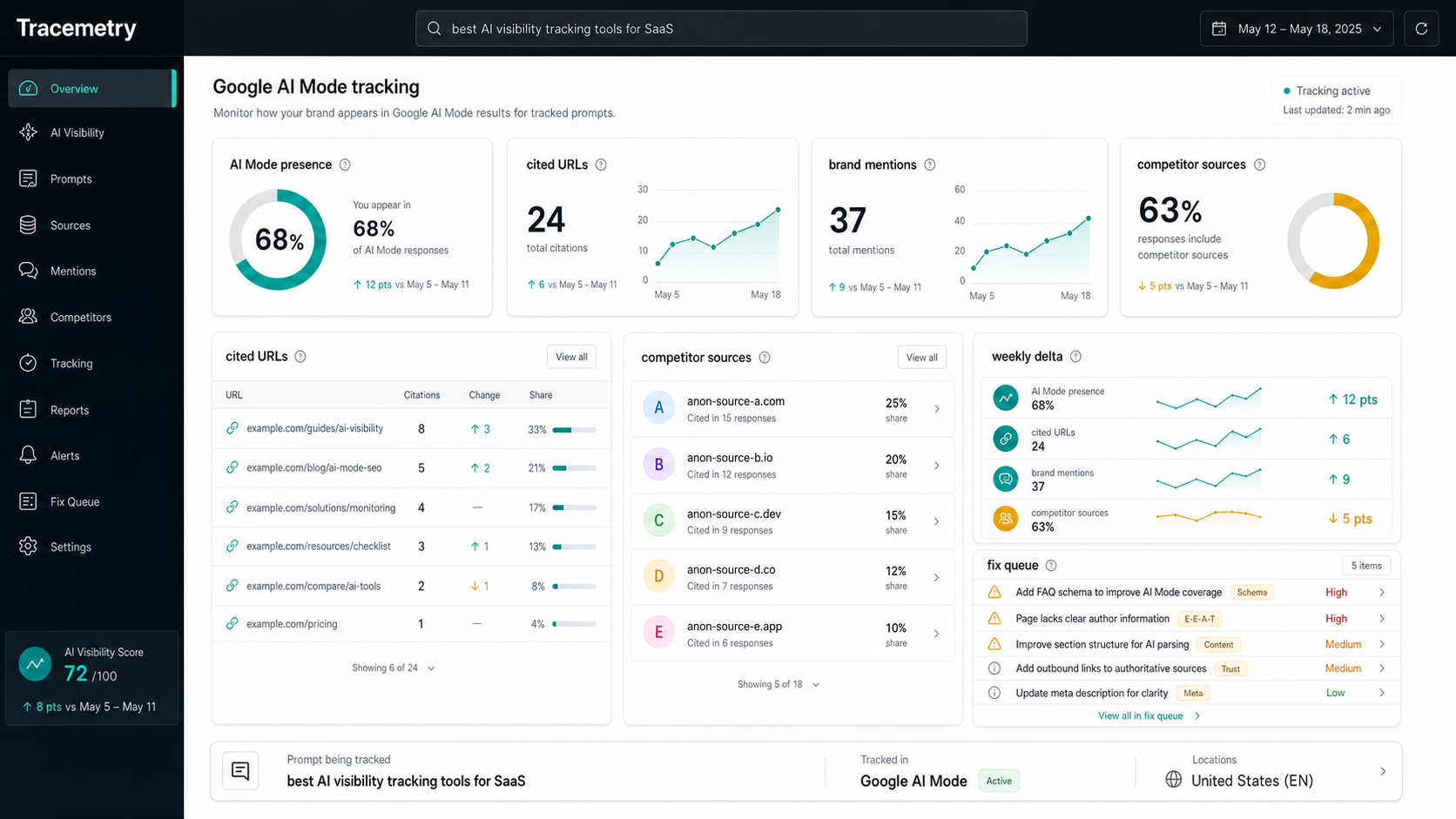
Google describes AI Mode as a Search experience for more complex exploration, reasoning, comparisons, follow-up questions, and links to supporting websites. Google also says AI Mode and AI Overviews may use query fan-out, where the system issues multiple related searches across subtopics and data sources before generating the answer. That means one visible prompt can turn into several hidden retrieval paths. Your tracking has to capture the final answer, the exposed sources, and the page that should have won.
What is AI Mode tracking?
AI Mode tracking is the weekly process of monitoring Google AI Mode answers for buyer-relevant questions, including answer presence, cited URLs, cited domains, brand mentions, competitor mentions, answer accuracy, follow-up behavior, and changes over time.
AI Mode tracking is the Google Search-specific branch of AI visibility measurement. It sits between classic SEO reporting and assistant prompt monitoring: the surface is Google Search, but the user behavior is conversational, source-driven, and often broader than one keyword.
Track AI Mode separately from AI Overview tracking. AI Overviews appear inside a classic results page when Google decides the generated snapshot is useful. AI Mode is an end-to-end AI Search tab/experience where users can ask longer questions and continue with follow-ups. The same topic can produce different links, different cited sources, and different commercial framing in each surface.
Why should SEO teams track AI Mode separately?
Track AI Mode separately because the answer can be built from query fan-out, not just the exact keyword you typed. A page can rank well for the head term while AI Mode pulls supporting evidence from competitor comparisons, help docs, listicles, forums, or product pages that answer the hidden sub-questions better.
Google's Search Central guidance says AI Overviews and AI Mode may use query fan-out, issuing related searches across subtopics and data sources. Google's AI Mode announcement also says AI Mode breaks questions into subtopics and runs many searches simultaneously. For an SEO team, that changes the measurement unit from "keyword rank" to "answer ownership."
Use this decision table:
| What you see in AI Mode | What it means | What to track next |
|---|---|---|
| Your brand is named and your URL is cited | Strong answer ownership | Citation position, target URL, answer accuracy |
| Your brand is named but a competitor or publisher is cited | Entity visibility without source ownership | Missing proof, weak page structure, third-party source gap |
| A competitor is recommended first | Shortlist risk | Competitor SOV, comparison-page gaps, proof gaps |
| A neutral publisher is cited repeatedly | Category authority gap | Review/listicle coverage, cited source themes |
| No source is exposed for a claim | Harder attribution | Answer accuracy, repeated phrasing, follow-up links |
| Classic rank is stable but AI Mode excludes you | Hidden retrieval mismatch | Fan-out query coverage and target-page fit |
The painful version: your SEO dashboard can look fine while Google AI Mode trains buyers to trust another source. The desired outcome is a report that says exactly which page to fix before next week's run.
Which prompts belong in an AI Mode tracking set?
Track prompts where AI Mode can shape a buyer's understanding, shortlist, comparison, or next action. Do not paste your keyword list into AI Mode and call it done. Start with real questions a prospect would ask when they are diagnosing a problem or choosing a tool.
Build the first set from seven buckets:
| Prompt bucket | Example AI Mode prompt | Why it matters |
|---|---|---|
| Category definition | "what is AI visibility tracking for SaaS" | Tests whether your entity owns the category explanation |
| Workflow | "how do I track Google AI Mode citations every week" | Tests source-worthy educational pages |
| Tool shortlist | "best AI visibility tracking tools for a B2B SaaS team" | Tests commercial recommendation visibility |
| Comparison | "Tracemetry vs Profound for AI search monitoring" | Tests positioning and competitor framing |
| Failure mode | "why does Google AI cite competitors instead of my website" | Tests urgent problem-solving content |
| Revenue-adjacent | "AI visibility platform with briefs and publishing workflow" | Tests product capability understanding |
| Follow-up | "which page should I update first after losing an AI citation" | Tests whether the answer can stay accurate through a conversation |
Use exact terms only where natural: AI Mode tracking, Google AI Mode, AI Mode citations, AI Overview tracking, Google AI features, cited URLs, brand mentions, competitor sources, query fan-out, source ownership, AI visibility tracking, generative engine optimization, and answer engine optimization.
Then add conversational phrasing because AI Mode demand is not a rank-tracker export:
- "How do I know if Google AI Mode cites my website?"
- "Why does AI Mode mention a competitor but not my brand?"
- "What is the best way to track AI Mode visibility weekly?"
- "When should I update a page after an AI Mode source loss?"
- "How is AI Mode tracking different from AI Overview tracking?"
Forty prompts is enough for a first baseline. Eighty is better once the team can act on the output. More than that is theatre unless someone owns the fix queue.
What should you record for every AI Mode run?
Record the fields that let you make a page decision. The minimum row needs the prompt, surface, date, location, device, brands mentioned, cited URLs, target URL, answer accuracy, follow-up behavior, and loss reason.
Use this row shape:
| Field | Example | Why it matters |
|---|---|---|
| Surface | Google AI Mode | Keeps it separate from AI Overviews and Gemini Apps |
| Prompt | "best AI visibility tracking tools for SaaS" | The demand unit |
| Prompt bucket | Tool shortlist | Lets you weight commercial prompts |
| Locale/device | US, desktop | Keeps repeat runs comparable |
| Brands mentioned | Tracemetry, Profound, Peec | Feeds share-of-voice reporting |
| Cited URLs | /blog/ai-visibility-tracking, competitor page, publisher list | Shows source ownership |
| Target URL | /blog/ai-visibility-tracking | Shows whether the right page won |
| Answer accuracy | Correct, incomplete, stale, wrong | Catches reputation and product-risk issues |
| Follow-up behavior | Source stays, source changes, no source | Shows whether the answer holds through conversation |
| Loss reason | Missing page, weak proof, unclear entity, third-party source win | Turns tracking into work |
Google's 2026 Search Console announcement introduced generative AI performance reports for a subset of sites, with impressions, pages, countries, devices, and dates for generative AI features in Search and Discover. Use those reports when available. They still do not replace prompt-level tracking because Search Console cannot tell you the exact answer text, competitor framing, or why a source won.
How do you connect AI Mode tracking to Search Console?
Use Search Console for page-level visibility and traffic evidence, then use AI Mode tracking for source-level diagnosis. Search Console can show whether URLs appeared in generative AI features when the new report is available to your property. AI Mode tracking shows what the answer said and which source shaped it.
Use this combined workflow:
- Baseline the AI Mode prompt set. Run 40-80 buyer questions and record answers, citations, and brands.
- Check Google generative AI reporting. Look for the pages that appear in Search generative AI features, where available.
- Map prompts to target URLs. Every prompt needs one URL that should own the answer.
- Find mismatches. If Search Console shows impressions but AI Mode cites the wrong page, fix internal signals. If AI Mode cites competitors, fix source quality.
- Update one high-intent page. Add the direct answer, table, proof, sources, visible FAQ, and internal links.
- Re-measure in 7-14 days. Use the same prompt wording and test setup.
This avoids the two common mistakes: treating Search Console as the whole AI visibility picture, or treating screenshots as a performance report.
How do you improve AI Mode visibility after tracking?
Improve AI Mode visibility by making the intended page a better source for the real buyer question and its likely subtopics. Do not publish a thin "AI Mode SEO" post for every variation. Google's generative AI optimization guide warns against overdoing pages made only for query variations; the durable fix is useful, non-commodity content that clearly helps the reader.
Use this fix sequence:
- Pick the losing prompt with the highest commercial value. Start where a competitor is named or cited for a buyer question.
- Inspect the winning source. Note the answer shape, evidence, examples, freshness, and entity language.
- Choose the target URL. Prefer improving an existing page unless no page matches the intent.
- Add a 40-80 word direct answer. Put it immediately under the relevant H2.
- Cover the fan-out subtopics. Add comparison criteria, failure modes, examples, pricing-adjacent language, and source-quality checks where natural.
- Make evidence extractable. Use a decision table, checklist, definition block, or step list.
- Cite primary sources for platform claims. For Google behavior, use Google Search Central or the Google Search blog before secondhand summaries.
- Link the page into the cluster. Connect it from AI visibility tracking, schema markup for AI search, and relevant citation pages.
- Re-run the exact prompt. Do not declare victory from a fresh prompt that is easier to win.
The fastest win is often a page update, not a new post. If AI Mode mentions your category but cites a competitor, your page probably needs clearer entity language, fresher proof, and a better answer block. If AI Mode cites a publisher, you may need third-party proof or a comparison page that deserves to be cited.
How is AI Mode tracking different from AI Overview tracking?
AI Mode tracking measures a conversational Google AI Search experience. AI Overview tracking measures AI-generated snapshots inside classic Google results. Both matter, but they should not be blended because the trigger behavior, visible layout, follow-up behavior, and exposed links can differ.
| Measurement layer | AI Overview tracking | AI Mode tracking |
|---|---|---|
| User behavior | Search result scan | Conversational exploration |
| Main unit | Keyword/search query | Prompt plus follow-ups |
| Source behavior | Cited links inside or around the snapshot | Supporting links inside a generated response |
| Best metric | Presence rate and cited URL rate | Source ownership, answer accuracy, follow-up stability |
| Search Console role | Traffic and generative AI visibility reporting | Page visibility evidence, not answer diagnosis |
| Fix pattern | Improve target page for SERP answer | Improve target page for answer plus fan-out subtopics |
For a serious Google AI visibility program, report them side by side:
- AI Overview presence rate.
- AI Mode answer ownership rate.
- Domain citation rate by surface.
- Target URL citation rate.
- Competitor share of voice.
- Answer accuracy risk.
- Page fixes shipped and re-measured.
What does a good weekly AI Mode report look like?
A good AI Mode report is short, comparable, and tied to page work. It should show whether your brand entered the answer, whether your domain supported the answer, which competitors gained, and which page should be updated before the next run.
Use this format:
- Score: Mention rate, domain citation rate, target URL citation rate, competitor SOV, and answer accuracy.
- Movement: Prompts gained, lost, and unchanged since last week.
- Source ownership: The URLs AI Mode cited instead of yours.
- Follow-up drift: Prompts where your brand appeared in the first answer but disappeared after a follow-up.
- Fix queue: One page update, one proof gap, one re-measure date.
If the report does not create work, it is just anxiety with charts. The point of tracking is to ship better source pages, not to collect weird AI screenshots. For the page-fix side of the loop, read Google AI Overview SEO and use the same source-ownership checklist for AI Mode losses.
FAQ
What is AI Mode tracking? AI Mode tracking is the process of monitoring Google AI Mode answers for tracked buyer questions, including cited URLs, cited domains, brand mentions, competitor mentions, answer accuracy, follow-up behavior, and week-over-week changes.
Can Search Console show AI Mode performance? Google says AI Mode and AI Overviews are included in overall Search Console performance data, and Google has begun rolling out dedicated generative AI performance reports to a subset of sites. Search Console can help with page visibility, but prompt-level tracking is still needed to inspect exact answers, citations, competitors, and loss reasons.
How many AI Mode prompts should I track? Start with 40 prompts across category, workflow, shortlist, comparison, failure-mode, revenue-adjacent, and follow-up intent. Expand toward 80 once the team has a weekly process for fixing pages and re-measuring losses.
How is AI Mode tracking different from Gemini citation tracking? Gemini citation tracking can include Gemini Apps and other Google AI surfaces. AI Mode tracking is specific to Google Search's AI Mode experience, where prompt wording, follow-ups, source links, and Search Console evidence should be measured separately.
What should I do when AI Mode cites a competitor? Pick the target page that should have won, inspect the cited competitor source, then update your page with a direct answer, comparison criteria, useful examples, credible sources, visible FAQ content, schema that matches the page, and internal links from related posts. Re-measure the same prompt after publishing.
Does AI Mode require special schema or an AI-specific file? Google says there are no special technical requirements, no special schema.org markup, and no new machine-readable files required for AI Overviews or AI Mode. The practical work is still crawlable, indexable, helpful content with clear structure, visible text, internal links, and structured data that matches the page.
Sources: Google AI features and your website, Google generative AI performance reports in Search Console, Google guide to optimizing for generative AI search, Google AI Mode announcement.
Start with the prompts Google can use to choose your competitor
Run the free Tracemetry audit to see which AI answers name your brand, cite your pages, and recommend competitors. Use Tracemetry Pro when you need weekly AI Mode tracking, AI Overview monitoring, source-grounded briefs, publishing workflow, and re-measurement in one operating loop.
Frequently asked questions
What is AI Mode tracking?
AI Mode tracking is the process of monitoring Google AI Mode answers for tracked buyer questions, including cited URLs, cited domains, brand mentions, competitor mentions, answer accuracy, follow-up behavior, and week-over-week changes.
Can Search Console show AI Mode performance?
Google says AI Mode and AI Overviews are included in overall Search Console performance data, and Google has begun rolling out dedicated generative AI performance reports to a subset of sites. Search Console can help with page visibility, but prompt-level tracking is still needed to inspect exact answers, citations, competitors, and loss reasons.
How many AI Mode prompts should I track?
Start with 40 prompts across category, workflow, shortlist, comparison, failure-mode, revenue-adjacent, and follow-up intent. Expand toward 80 once the team has a weekly process for fixing pages and re-measuring losses.
How is AI Mode tracking different from Gemini citation tracking?
Gemini citation tracking can include Gemini Apps and other Google AI surfaces. AI Mode tracking is specific to Google Search's AI Mode experience, where prompt wording, follow-ups, source links, and Search Console evidence should be measured separately.
What should I do when AI Mode cites a competitor?
Pick the target page that should have won, inspect the cited competitor source, then update your page with a direct answer, comparison criteria, useful examples, credible sources, visible FAQ content, schema that matches the page, and internal links from related posts. Re-measure the same prompt after publishing.
Does AI Mode require special schema or an AI-specific file?
Google says there are no special technical requirements, no special schema.org markup, and no new machine-readable files required for AI Overviews or AI Mode. The practical work is still crawlable, indexable, helpful content with clear structure, visible text, internal links, and structured data that matches the page.
See your own AI visibility today.
Free public report. 60 seconds. No signup. Or get started on Pro to track 250 prompts continuously.