AI visibility report: dashboard template, metrics, and weekly workflow
How to build an AI visibility report for ChatGPT, Perplexity, Gemini, Claude, and Google AI Overviews: prompt coverage, mention rate, citation rate, competitor SOV, answer accuracy, and next fixes.
An AI visibility report is the weekly operating document that shows whether AI assistants mention your brand, cite your pages, recommend competitors, and repeat accurate positioning. The painful problem is that most teams still report SEO rankings, impressions, and traffic while ChatGPT, Perplexity, Gemini, Claude, and Google AI Overviews are changing the buyer shortlist before a click happens.
Use the fast rule: a useful report needs five sections only: prompt coverage, brand mentions, cited URLs, competitor share of voice, and the next fix queue. If the report does not tell the team what to update, publish, or re-measure this week, it is not a visibility report. It is a screenshot archive. For the collection layer behind the report, use AI search prompt monitoring, and add AI crawler tracking when a technical access issue could explain a citation loss.
This guide builds on AI visibility tracking, AI share of voice, and the 90-day generative engine optimization strategy. Use it when leadership asks, "Are we actually showing up in AI search, and what are we doing about it?"
If you manage multiple brands, use the AI visibility dashboard for agencies to add client workspaces, versioned cohorts, intervention logs, export rules, and defensible cross-account reporting.
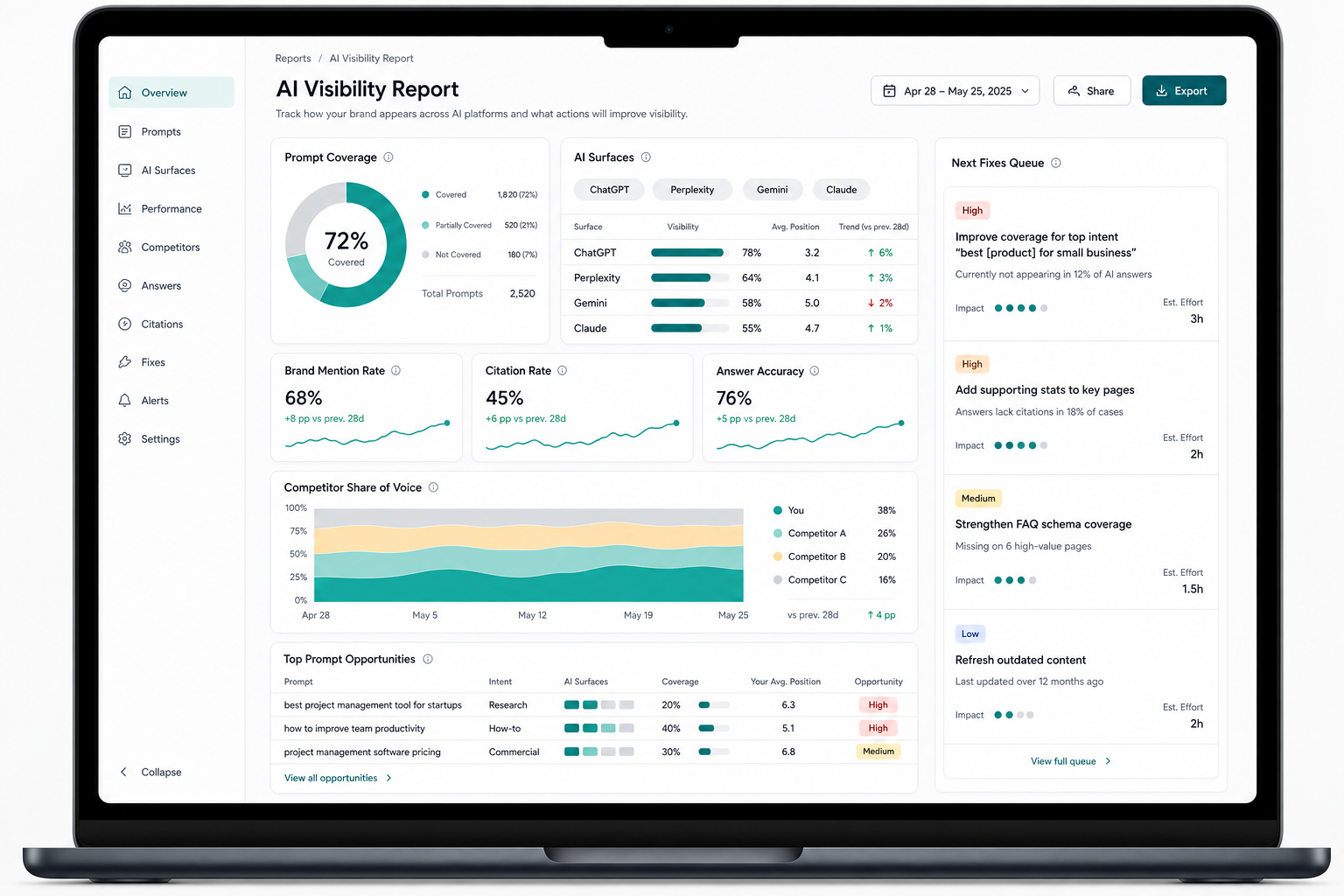
What is an AI visibility report?
An AI visibility report is a recurring summary of how a brand appears in AI-generated answers across a locked prompt set. It separates brand mentions, domain citations, competitor recommendations, answer accuracy, cited URLs, and work shipped so teams can connect AI search visibility to page fixes and pipeline risk.
AI visibility report is the reporting layer above prompt tracking. Prompt tracking collects the answer data. The report turns that data into a decision: which buyer questions you win, which ones competitors own, which pages get cited, and which fix should ship next.
Google says sites that appear in AI features such as AI Overviews and AI Mode are included in overall Search Console traffic reporting, but Search Console does not give a clean prompt-by-prompt answer export. OpenAI's ChatGPT Search help page also describes source citations inside search answers. That means the report has to combine traditional search data with direct answer-engine observations.
What should an AI visibility report include?
An AI visibility report should include the exact prompt set, surfaces tested, brand mention rate, domain citation rate, competitor share of voice, cited URLs, answer accuracy issues, shipped fixes, and next actions. Skip vanity charts until these fields are reliable.
Use this report template:
| Section | What it answers | Required fields |
|---|---|---|
| Executive summary | Are we more or less visible than last week? | Mention rate, citation rate, SOV, largest gain, largest loss |
| Prompt coverage | Which buyer questions were tested? | Prompt, intent, surface, run date, stage weight |
| Brand and competitor score | Who appears in answers? | Your brand, approved competitors, substitutes, mention counts |
| Source ownership | Which URLs are cited? | Cited domain, cited URL, citation position, page type |
| Answer quality | Is the answer accurate? | Correct, incomplete, stale, wrong, missing proof |
| Work queue | What should change now? | Fix type, owner, target URL, re-measure date |
The fastest useful version fits on one page. A longer dashboard can exist behind it, but the weekly readout should make the decision obvious: update an existing page, publish a missing page, fix schema, earn third-party proof, or re-test a shipped change.
When the report needs a single executive number, use an AI visibility score as the rollup and keep the prompt-level table underneath it. When the team is deciding what to track in the first place, use the answer engine optimization metrics scorecard to separate recommendation rate, target URL citation rate, answer accuracy, AI referrals, and fix-to-win movement. The score is for trend, not diagnosis.
Add an answer accuracy line to that weekly readout when AI answers repeat stale pricing, wrong feature details, or misleading competitor comparisons. Add AI answer volatility tracking when the same prompt keeps swapping recommendations, cited URLs, competitors, or sentiment from one run to the next. A brand mention is not a win if the answer creates a bad sales conversation or disappears before the next report.
Which metrics matter most in an AI visibility dashboard?
The core metrics are mention rate, citation rate, source ownership, AI share of voice, answer accuracy, and prompt-level movement. Report each by surface because ChatGPT, Perplexity, Gemini, Claude, and Google AI Overviews can produce different winners for the same buyer question.
Track these metrics before adding advanced scoring:
| Metric | Definition | Why it matters |
|---|---|---|
| Mention rate | Percent of prompt runs where your brand is named | Shows whether the brand enters the answer at all |
| Citation rate | Percent of prompt runs where your domain is cited | Shows whether there is a source path back to your site |
| Source ownership | The pages and domains cited for each prompt | Shows which page should be improved or defended |
| Competitor SOV | Your share of brand mentions against the approved competitor set | Shows whether you are gaining or losing the shortlist |
| Answer accuracy | Whether the answer describes your product, category, pricing, or positioning correctly | Shows reputation and conversion risk |
| Prompt movement | Week-over-week change on the same prompt wording | Shows whether fixes changed the answer |
Do not merge mentions and citations into one blended "visibility" number. A brand can be mentioned without a source. A competitor can be cited without being praised. A publisher can own the source slot while no vendor gets recommended. Those are different problems with different fixes.
How do you build the prompt set for the report?
Build the prompt set from buyer jobs, not from a random keyword list. Include category discovery, tool shortlist, comparison, alternatives, workflow, failure-mode, pricing-adjacent, integration, and surface-specific questions. Keep the wording stable so the report is comparable week over week.
Start with 40-80 prompts across these buckets:
| Prompt bucket | Example AI query | What the report learns |
|---|---|---|
| Category | "what is AI visibility reporting for B2B SaaS" | Whether the category is understood |
| Shortlist | "best AI visibility dashboard for a startup marketing team" | Which vendors enter the list |
| Comparison | "Tracemetry vs Profound for AI visibility reports" | Which vendor the answer prefers |
| Alternative | "best Otterly alternative for weekly AI search reporting" | Which challenger pages are visible |
| Workflow | "how do I create an AI visibility report for executives" | Whether educational pages get cited |
| Failure mode | "why does ChatGPT mention competitors but not my brand" | Which urgent gaps need fixes |
| Surface-specific | "how do I report Google AI Overview citations" | Which engine needs separate handling |
| Pricing-adjacent | "affordable AI visibility tracking dashboard for SaaS" | Whether commercial prompts are visible |
Add entity terms that disambiguate the report: AI visibility report, AI visibility dashboard, AI search visibility, generative engine optimization, ChatGPT Search, Perplexity citations, Google AI Overviews, Gemini, Claude, mention rate, citation rate, AI share of voice, source ownership, answer accuracy, B2B SaaS, comparison pages, and pricing pages.
How should you present AI visibility to executives?
Present AI visibility as risk, movement, and next action. Executives do not need every prompt screenshot. They need to know which buyer questions are being shaped by AI answers, whether competitors are gaining recommendations, and which fixes will change the next report.
Use this executive summary format:
- Score: "Our weighted AI share of voice moved from X to Y across the locked buyer prompt set."
- Risk: "Competitor A gained on comparison prompts because two publisher pages cite them and not us."
- Source gap: "Our domain is mentioned often, but citation rate is weak on workflow prompts."
- Fix shipped: "We updated the category page, added a decision table, and linked it from three related posts."
- Next action: "Re-measure the 12 affected prompts next week and publish one alternatives page if the source gap remains."
The mistake is reporting "AI traffic" as the whole story. Some AI features show up inside Search Console's broader web reporting, some chat assistants cite sources without sending measurable traffic, and some answers influence a shortlist with no click at all. Add an AI referral traffic scorecard to the report, but keep prompt visibility and source ownership beside it so the team sees what buyers saw, not only what analytics received.
How do you turn report findings into page fixes?
Turn every finding into one loss reason and one next action. A visibility report should not end with "monitoring needed." It should assign a fix: update a page, create a page, clarify entity language, align schema with visible content, add internal links, or earn a credible third-party mention.
For ecommerce reports, separate product-page losses from guide-page losses. If an AI answer cites a marketplace, review publisher, or competitor for a product-fit prompt, the next fix is usually the product URL itself. Use product page answer engine optimization for that page-level checklist.
Use this triage table:
| Finding | Likely cause | Best next fix |
|---|---|---|
| Competitor named, you absent | Missing page or weak entity clarity | Create or rewrite the page that should answer the prompt |
| You named, competitor cited | Weak source ownership | Add direct answers, tables, examples, sources, and internal links |
| Wrong Tracemetry page cited | Ambiguous page titles or internal anchors | Clarify title, H2s, canonical, and links from related posts |
| Old product claim repeated | Stale public copy | Update visible product, pricing, docs, and comparison pages |
| Publisher dominates vendor prompt | Third-party proof gap | Earn review, partner, directory, analyst, or customer-source mentions |
| FAQ schema says more than the page | Markup/content mismatch | Make visible FAQ text match structured data |
Google's structured data guidelines are the right operating principle: structured data should represent user-visible page content. For AI visibility reporting, the same rule applies to every fix. Do not hide the answer in metadata. Put the answer on the page where a human and a retrieval system can both read it.
How often should you send an AI visibility report?
Send the operating report weekly and the executive rollup monthly. Weekly is frequent enough to catch answer drift and confirm whether shipped fixes moved target prompts. Daily reporting is useful only during launches, rebrands, pricing changes, incidents, or major migrations.
Use three cadences:
| Cadence | Best use | What to include |
|---|---|---|
| Weekly | Marketing and content operators | Prompt changes, cited URLs, losses, fixes, owners |
| Monthly | Leadership | Weighted SOV, major risks, shipped work, pipeline-relevant prompt wins |
| 14-day sprint | Launches or incidents | Daily high-intent prompt checks, answer accuracy, urgent source gaps |
The cadence matters because AI answers drift. If the wording changes every week, the report becomes anecdotal. If the prompt set is stable but the readout is late, competitors can own an answer for a month before anyone notices.
What does a good AI visibility report look like?
A good AI visibility report is short, comparable, and action-oriented. It shows the same prompt universe every week, separates surfaces, names the pages that were cited, explains the biggest movement, and ends with a prioritized fix queue.
Use this minimum structure:
- 5-line executive summary
- Surface scorecard for ChatGPT, Perplexity, Gemini, Claude, and Google AI Overviews
- Top 10 gained prompts
- Top 10 lost prompts
- Competitor movement by prompt bucket
- Cited URLs by domain and page type
- Answer accuracy issues
- Fixes shipped since last report
- Next fixes with owner and re-measure date
For the measurement math, use the AI share-of-voice formula. For source-level analysis, split the report into ChatGPT citation tracking, Perplexity citation monitoring, and AI Overview tracking views when the surface behavior diverges.
What mistakes make the report useless?
The common mistakes are changing the prompt set every week, blending all AI surfaces into one score, counting weak brand mentions as wins, ignoring cited URLs, and reporting activity instead of movement. Those mistakes make the report look full while hiding the answer gaps that actually affect buyers.
Avoid these:
- Tracking 10 prompts you already win and calling it category visibility.
- Adding new prompts after a campaign just to make the score look better.
- Treating ChatGPT, Perplexity, Gemini, Claude, and AI Overviews as one engine.
- Counting a brand mention without checking whether your domain was cited.
- Reporting screenshots without classifying the loss reason.
- Publishing pages without linking them from related AI search content.
- Adding FAQ schema that does not match visible FAQ copy.
- Measuring content output instead of prompt movement.
The report should make accountability uncomfortable in a useful way. If a competitor is winning a high-intent prompt, the team should know which source made that answer possible and what has to change before the next run.
FAQ
What is an AI visibility report? An AI visibility report is a recurring summary of how your brand appears in AI-generated answers across a locked prompt set. It tracks brand mentions, domain citations, competitor recommendations, cited URLs, answer accuracy, and next fixes across surfaces like ChatGPT, Perplexity, Gemini, Claude, and Google AI Overviews.
What should an AI visibility dashboard track? An AI visibility dashboard should track prompt coverage, mention rate, citation rate, source ownership, competitor share of voice, answer accuracy, surface-level movement, and a fix queue. The fix queue matters because reporting without action will not improve AI search visibility.
How is an AI visibility report different from SEO reporting? SEO reporting usually tracks rankings, impressions, clicks, and conversions from search result pages. An AI visibility report tracks generated answers: whether your brand is named, whether your domain is cited, which competitors are recommended, and whether the answer is accurate.
How many prompts do I need for an AI visibility report? Start with 40-80 prompts across category, shortlist, comparison, alternative, workflow, failure-mode, pricing-adjacent, integration, and surface-specific intent. Fewer than 20 prompts is usually too easy to cherry-pick. Larger programs can expand once the team is acting on the findings.
How often should I send an AI visibility report? Send an operating report weekly and an executive rollup monthly. Weekly reporting catches prompt movement and gives content teams a fix queue. Daily reporting is only useful during launches, rebrands, pricing changes, incidents, or major content pushes.
What is the fastest way to improve a weak AI visibility report? Find the highest-intent prompt where a competitor is cited and your domain is absent. Improve the page that should answer that prompt with a direct answer, decision table, current product details, credible sources, visible FAQ content, matching schema, and internal links from related pages.
Build the report from real answer data
Run the free Tracemetry audit to see whether AI answers mention your brand, cite your site, and recommend competitors. If the snapshot shows a gap, use Tracemetry Pro to track a full prompt set, generate the weekly visibility report, publish source-grounded fixes, and re-measure the prompts that matter.
Sources: Google AI features and your website, OpenAI ChatGPT Search, Google structured data guidelines, Google structured data introduction. For a report built specifically around recommendations, target-page citations, answer accuracy, and fix ownership, use the answer engine optimization report template.
Frequently asked questions
What is an AI visibility report?
An AI visibility report is a recurring summary of how your brand appears in AI-generated answers across a locked prompt set. It tracks brand mentions, domain citations, competitor recommendations, cited URLs, answer accuracy, and next fixes across surfaces like ChatGPT, Perplexity, Gemini, Claude, and Google AI Overviews.
What should an AI visibility dashboard track?
An AI visibility dashboard should track prompt coverage, mention rate, citation rate, source ownership, competitor share of voice, answer accuracy, surface-level movement, and a fix queue. The fix queue matters because reporting without action will not improve AI search visibility.
How is an AI visibility report different from SEO reporting?
SEO reporting usually tracks rankings, impressions, clicks, and conversions from search result pages. An AI visibility report tracks generated answers: whether your brand is named, whether your domain is cited, which competitors are recommended, and whether the answer is accurate.
How many prompts do I need for an AI visibility report?
Start with 40-80 prompts across category, shortlist, comparison, alternative, workflow, failure-mode, pricing-adjacent, integration, and surface-specific intent. Fewer than 20 prompts is usually too easy to cherry-pick. Larger programs can expand once the team is acting on the findings.
How often should I send an AI visibility report?
Send an operating report weekly and an executive rollup monthly. Weekly reporting catches prompt movement and gives content teams a fix queue. Daily reporting is only useful during launches, rebrands, pricing changes, incidents, or major content pushes.
What is the fastest way to improve a weak AI visibility report?
Find the highest-intent prompt where a competitor is cited and your domain is absent. Improve the page that should answer that prompt with a direct answer, decision table, current product details, credible sources, visible FAQ content, matching schema, and internal links from related pages.
See your own AI visibility today.
Free public report. 60 seconds. No signup. Or get started on Pro to track 250 prompts continuously.