Alt text vs captions: image SEO examples for publishers
Choose alt text, captions and longer image descriptions by purpose. Review real publisher examples and use a practical image SEO checklist for your site.
Alt text vs caption comes down to purpose: alt text provides an image's text alternative, while a caption gives visible context alongside the image. Useful image SEO starts by deciding what a reader needs from the image, then checking that the chosen text reaches the published page.
This guide is for publishers using illustrations, diagrams, charts or screenshots in source pages. It combines Google and W3C guidance with a limited check of three existing Tracemetry images. The check records delivered attributes and file responses; it does not measure ranking effects or certify accessibility.
Download the three-image observation CSV. It contains the actual November 20 observations, with nine columns and three data rows. For the surrounding editorial workflow, see the AEO overview, publisher guide and content refresh workflow.
What is the difference between alt text and a caption?
Alt text is attached to the image; a caption is visible page content. They can complement each other, but adding one does not automatically supply the other. Review the image in its particular page context rather than treating every image field as another place to repeat the target keyword.
| Text or field | Main job in this review | Question to ask |
|---|---|---|
| Alt text | Provide the relevant text alternative | What would a reader miss if they could not see this image? |
| Caption | Explain the figure in visible nearby copy | Does the reader need context, attribution or a qualification? |
| Longer description or data table | Preserve essential detail beyond a short alternative | Is the image carrying a sequence, comparison or dataset the reader needs? |
| Filename | Identify the underlying asset | Is the name useful to maintain, without changing a good URL unnecessarily? |
MDN describes figcaption as a caption or legend for its parent figure. That is a useful HTML structure when an image and its visible explanation belong together. A caption can identify a source or clarify that a visual is an illustration; it does not need to repeat the alternative word for word.
Google's image SEO guidance says it uses alt text, image analysis and page content to understand an image. It also considers surrounding text such as captions, while filenames provide lighter clues. Describe the image usefully in context and avoid keyword stuffing. These are complementary signals, not a reason to fill every field with the same phrase.
How should image purpose change the alt decision?
Use the W3C alt decision tree before drafting a description. Its central distinction is what the image contributes to the current context. An image can be informative on one page and redundant on another.
| Purpose in this page | Starting point |
|---|---|
| Informative photograph or simple graphic | A brief alternative conveying its relevant meaning |
| Image that supplies the meaning of a link or button | The destination or action the reader needs to understand |
| Complex chart, map or diagram | A short identification plus the essential information in accessible text |
| Purely decorative or redundant image | An empty alt attribute where the context makes that appropriate |
W3C’s decorative-image guidance explains the empty-alternative treatment. An empty alt="" is an explicit value; omitting the attribute is a different implementation. Do not make an informative image decorative simply to avoid writing a description, and do not force a long description onto a visual that adds no information beyond nearby text. Check the actual role and surrounding content first.
Keep wording concise enough to be usable and complete enough for the task. A character target cannot decide whether an important comparison, instruction or qualification has been preserved. When the detail is substantial, give it space in the body rather than trying to compress the entire explanation into an attribute.
What did our three-image HTML check show?
On November 20, 2026, we fetched three selected article pages, inspected their article-image attributes and requested the corresponding PNG files. We also visually inspected those assets. This was a selected sample, not a full-site crawl or an assistive-technology test.
| Existing article | Selected file response | Nonempty delivered alt | Figcaption elements in inspected article HTML |
|---|---|---|---|
| AEO team structure | HTTP 200 | Yes | 0 |
| AI citation decay | HTTP 200 | Yes | 0 |
| AEO for publishers | HTTP 200 | Yes | 0 |
The downloadable CSV preserves each observation's UTC timestamp, page URL, selected asset URL, delivered alt, article figcaption count, image response status, pixel dimensions and asset hash. The three PNG dimensions were 1672 by 941, 1536 by 1024 and 1672 by 941 respectively. Those dimensions describe files, not image quality scores.
A zero figcaption count means that particular element was absent from the inspected article HTML. A visible explanation could use another structure or appear in the surrounding body. Conversely, a nonempty alt field establishes a delivered value, not that the value is accurate or sufficient. Neither count settles the image's purpose or whether a reader can obtain its information.
The observations are a fixed sample captured before this guide was published. They do not cover every image on the site, every responsive state or what Google has indexed. We preserved the existing assets and their URLs; the example below reuses one of them with text chosen for this new context.
Worked example: a publisher workflow illustration
The publisher illustration has five visible stage labels connected in order: Question, Evidence, Source Page, Update and Recheck. In this guide, the reader's task is to understand that sequence. The graphic is an editorial illustration, not a chart of measured performance.
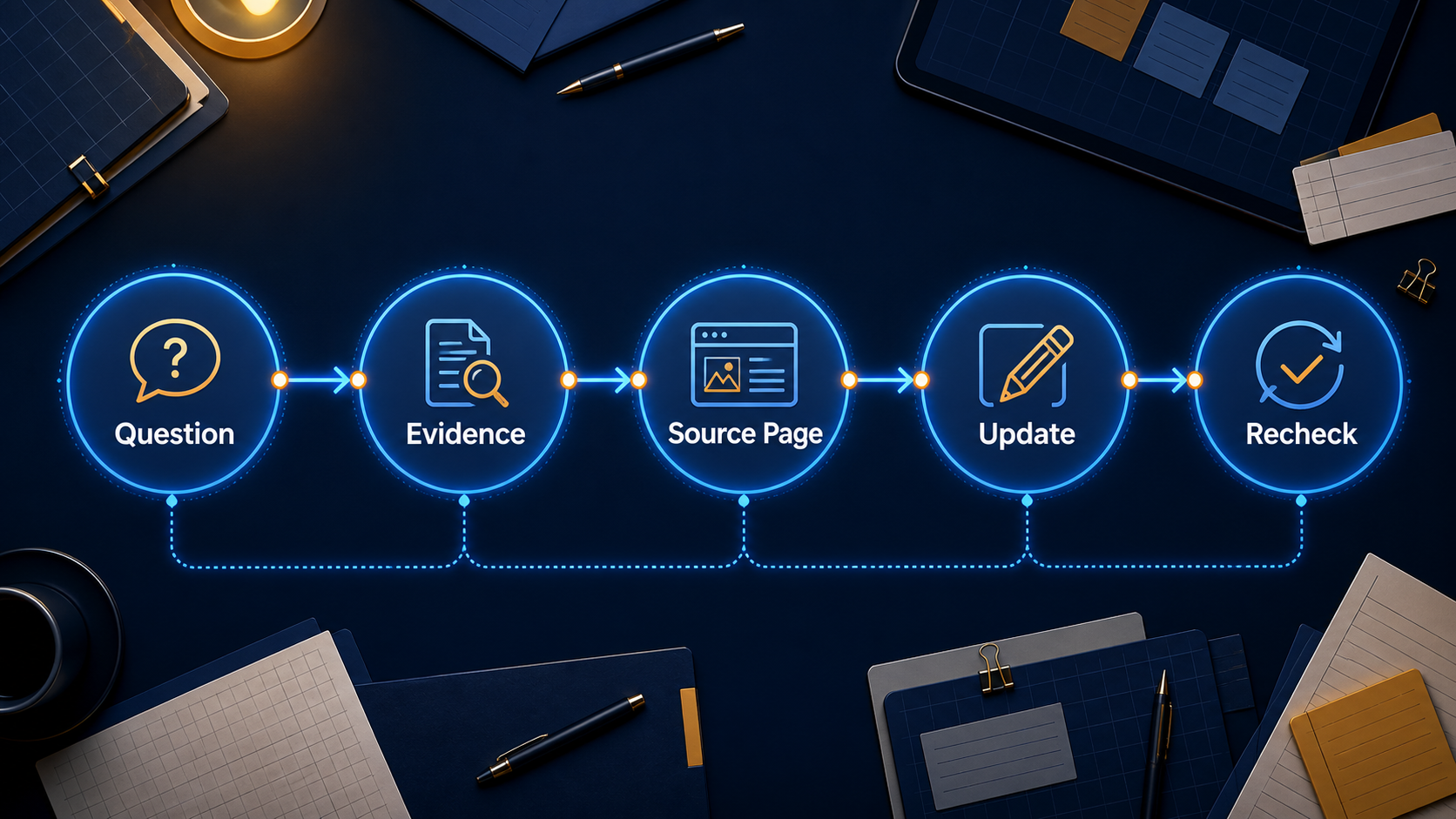
Here is the sequence in ordinary page text, with the interpretation used in this editorial example:
- Question: identify the reader's question and the intended page task.
- Evidence: preserve the material needed to support the explanation.
- Source Page: select the maintained URL that serves that task.
- Update: make an approved correction when the source needs one.
- Recheck: inspect the delivered change and keep later observations separate.
The alternative identifies the sequence, the caption explains the visual's status and source, and the body gives the stages room to be read without interpreting the artwork. They have related but different jobs. This is a proposed editorial treatment for the example, not a claim that every workflow image requires identical wording.
W3C's complex-image guidance describes short identification and a longer textual representation for images whose information cannot fit in a short alternative. For a real chart, that longer representation could include the important relationships and actual data. A caption saying “results chart” would not convey those details by itself.
How should charts, screenshots and illustrations differ?
First establish whether the image represents evidence or only illustrates an idea. The selected citation-decay image contains dashboard-like lines and panels. It is used as an illustration; our check did not extract a measured dataset from it. Do not read a drawn line as a traffic result or present an illustrative interface as proof of a working product feature.
For an actual chart, keep the underlying values, units, time period and relevant limitations available in text or a table. Identify the material comparison in the short alternative and provide the detail a reader needs outside it. The source-evidence worksheet can help preserve the claim and source separately when a graphic supports a factual statement.
For a screenshot, explain the relevant state or task. A picture of a settings panel can document a particular captured interface, but it does not establish that every plan, account or current version behaves the same way. Retain the source and capture context before writing a feature claim around the image.
For an illustration, use language that describes its role without converting it into a benchmark. The selected team image connects a central person icon with surrounding work icons; the actual responsibilities are explained in the team-structure guide. A reader should not have to infer decision rights from icon shapes alone.
How can an editor review image text before publishing?
Review a chosen page or figure as a reader task, then check the delivered implementation. This sequence is a manual editorial workflow, not an automatic scoring formula:
- Identify the purpose. State what the image contributes and whether it is informative, functional, complex or redundant in this context.
- Inspect the asset and evidence. Open the actual file. Check labels and details against any source data, and distinguish illustration from observation.
- Choose the text treatment. Write the alternative, visible caption and longer explanation that the reader needs. Avoid adding unsupported claims or repeating keywords for their own sake.
- Check the delivered output. Inspect the published image source, alt attribute and surrounding text. Confirm that the intended file loads and that the caption appears where it belongs.
- Review without relying on the picture. Read the relevant page text and check what information is missing. Include suitable accessibility evaluation for the page and interaction, beyond an attribute-presence check.
- Record the decision and owner. Keep the page URL, asset URL, purpose, chosen text, supporting evidence, review result and next action together.
A CMS preview, image-library field or source-file value can differ from what the final template delivers. Preserve both the intended text and the output you inspected. The internal-linking audit demonstrates the same broader distinction between a source inventory and what a reader can actually reach.
Keep a good existing image URL when the asset remains appropriate. If an asset or its role changes, review the pages that use it rather than automatically applying one description everywhere. The correct alternative depends on use, so a shared file does not imply a single universal text alternative.
Start with the three-image observation CSV as a concrete example of limited evidence. Add your own purpose and text decisions in a separate review record. Verifying delivered image text is a useful implementation result; this sample does not establish indexing, ranking or click improvements.
Frequently asked questions
What is the difference between alt text and a caption?
Alt text supplies an image’s text alternative; a caption provides visible context alongside the figure. Choose each for the information the reader needs rather than repeating the same keyword in both.
Does every image need both descriptive alt text and a caption?
No. The appropriate treatment depends on the image’s purpose and nearby text. A useful caption can explain context or attribution, while a decorative or redundant image can call for an empty alternative.
Is an empty alt attribute the same as a missing one?
No. Empty alt is an explicit value for an appropriate decorative or redundant use. A missing attribute does not record that decision; inspect the image’s role before choosing either treatment.
Can a caption replace the information in a complex chart?
A short caption alone does not communicate a chart’s essential relationships and values. Provide the needed longer description or data in accessible page text, alongside an appropriate short alternative.
Do three nonempty alt attributes prove the images are accessible?
No. The sample establishes delivered attribute values and file responses. Image purpose, text accuracy, surrounding content and suitable accessibility evaluation require further review.
Does this image SEO check prove ranking or click gains?
No. It is a fixed observation of three selected images and a worked editorial example. It does not measure Google indexing, ranking effects or traffic improvements.
Make your next SEO decision with better evidence.
Explore practical guides to AI visibility, source citations, and choosing the right tools for your team.